Sumant
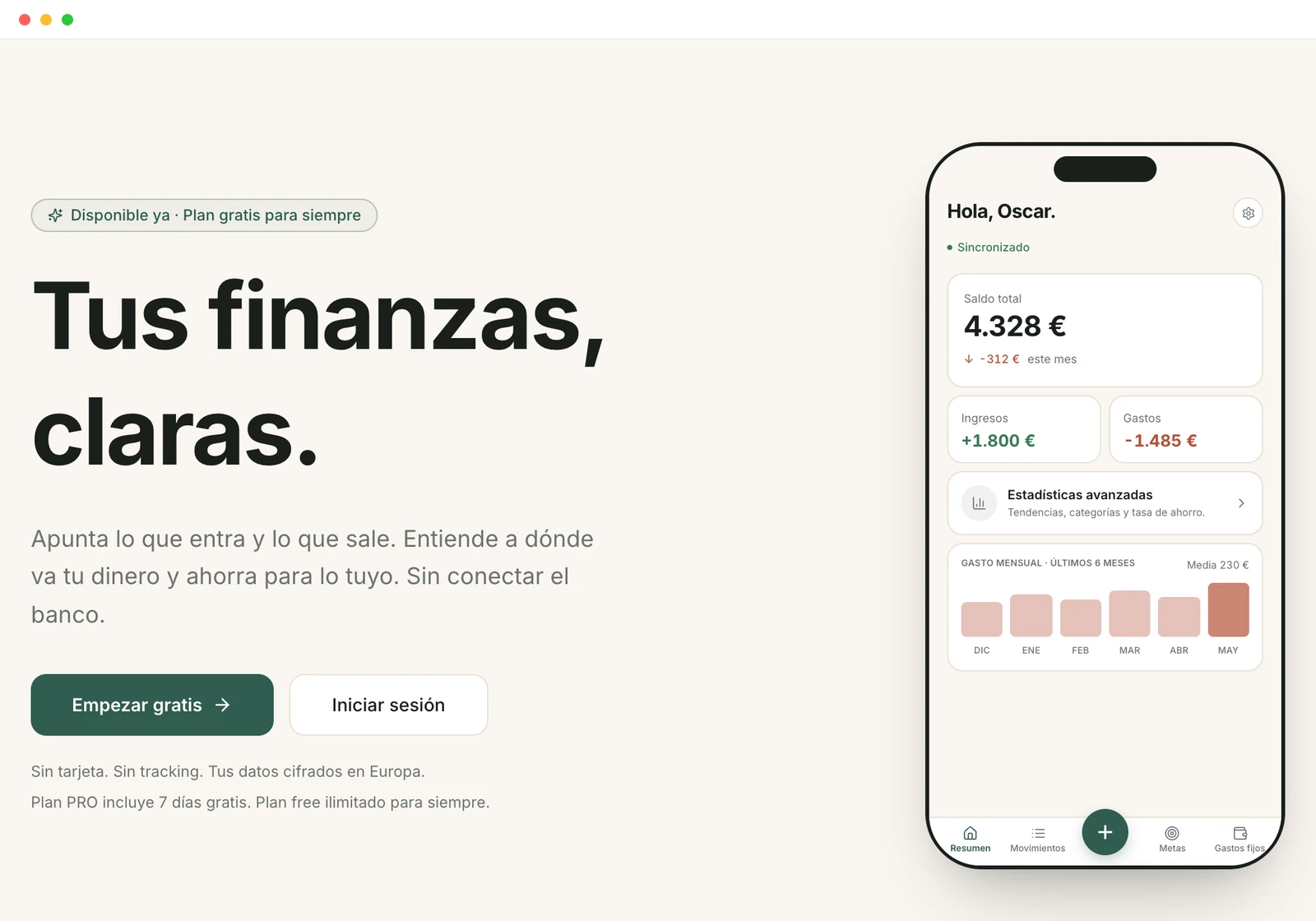
Local-first personal finance app: log an expense or import your bank statement without connecting a bank account, and without the data leaving the device except to sync.
The problem
Tracking personal finances usually means choosing between a spreadsheet you have to keep up by hand and an app that asks you to connect your bank, verify your identity and trust that your transactions live somewhere you know nothing about.
Sumant starts from the opposite idea: the app takes seconds to use, needs no banking credentials, and writes data to the device first. The account exists to sync between phone and desktop, not to unlock the product.
The solution
Accounts and transactions
product core
- Multiple accounts per user — cash, bank, card, savings or other — each with its own currency (14 available).
- Expenses, income and transfers between accounts, with custom categories and subcategories.
- Amounts stored as integer cents: direction comes from the transaction type, not from the number's sign.
Budgets, goals and fixed costs
planning
- Per-category budgets on a daily, weekly or monthly period.
- Savings goals with a target amount and deadline.
- Recurring expenses and subscriptions, plus net worth tracking with assets and liabilities.
Statement import
CSV · XLSX · Norma 43
- Automatic detection of the separator, the header row and what each column means, with reusable templates per bank.
- A reader for the AEB Norma 43 format, the standard statement file Spanish banks export.
- Duplicate detection and merchant grouping, so transactions get reviewed and categorized in batches instead of one by one.
Day-to-day use
PWA · ES/EN
- Dashboard, statistics, search and filters over the full history.
- Private mode that blurs every amount on screen.
- Installable as a PWA and usable offline; interface in Spanish and English.
Architecture
The system is three surfaces in one monorepo: the app, the public site and an internal operations panel. The decision that shapes everything else is that the UI never waits for the network: it writes to the browser database and syncing happens afterwards, in the background.
Client
Local-first
Cloud
- Identifiers are generated on the client, so data can be created offline with no risk of collision when it is uploaded.
- Every syncable entity carries an update timestamp and a soft delete: removing something does not break syncing on the other devices.
- Conflicts resolve last-write-wins, which is enough for a single-user product and avoids carrying a resolution engine nobody needs.
- In PostgreSQL every user table enforces row level security, so separation between accounts is guaranteed by the database rather than by the client.
- The public site and the internal panel are separate applications: the landing handles marketing, SEO and forms, and the panel requires two-factor auth and audits actions.
Technical challenges
Syncing without breaking the local experience
Writes never wait for the network, so the app has to remember what is still pending upload. It keeps a queue of operations and a progress marker per table, so on reconnect it only asks for what changed since last time. Downloads are paginated and uploads are batched to stay under the backend's request size limit, and the queried window overlaps slightly to tolerate clock drift between devices.
Reading a statement from any bank
Every bank exports differently: different separators, headers on different rows, different date and amount formats. Instead of maintaining one reader per bank, the importer infers the file structure, proposes a column mapping from synonyms and lets you save it as a template. For the Spanish market it adds a reader for the AEB Norma 43 format, which being a standard covers most banks with a single parser.
Not duplicating transactions
Re-importing an overlapping statement is the norm, not the exception. Each transaction produces a fingerprint from its stable fields, which makes it possible to detect what already exists before writing anything. Whatever is left gets grouped by merchant so dozens can be categorized at once.
Categorizing without the data leaving the device
Category suggestions and meaning-based search run on embeddings computed in the browser itself, with a self-hosted model executed on ONNX Runtime compiled to WebAssembly. No transaction is sent to an external AI service, and the embeddings never even enter sync: they stay on the device that produced them. This is the decision that makes the privacy claim a property of the architecture rather than a line in the privacy policy.
Changing the local schema without losing data
The database lives in the user's browser, so there is no maintenance window and no way to migrate in bulk from the server. Every model change is a schema version with its own migration function, and app startup has to be able to bring any old version up to the current one.
Tech stack
What sits behind this project
- A product taken end-to-end: idea, architecture, development, deployment and ongoing maintenance.
- Frontend architecture decisions made deliberately and with their trade-offs accepted, not copied from a template.
- Data modelling designed from day one to sync and to migrate.
- Privacy treated as a technical requirement that shapes the design.
- Actually running the product: monorepo, automated tests, error monitoring and payments.
Own project under active development. The repository is private; this page summarizes the architecture and the technical decisions. Sumant is free with a one-time PRO plan, and usage figures are not part of this summary.